On this page
Vulnerability scanning is the automated process of identifying security weaknesses in your code, dependencies, infrastructure, and running applications. Regular scanning is essential for proactive security management.
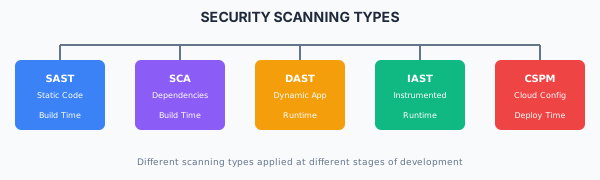
Types of Security Scanning
Security Scanning Types Static Application Security Testing (SAST)
What SAST Detects
SQL/NoSQL injection vulnerabilities
Cross-site scripting (XSS) patterns
Insecure cryptographic usage
Hardcoded secrets
Path traversal vulnerabilities
Unsafe deserialization
Command injection
Semgrep Configuration
# .semgrep.yml
rules:
  - id: sql-injection
    patterns:
      - pattern: |
          $DB.query($QUERY + ...)
      - pattern: |
          $DB.execute(f"...")
    message: Potential SQL injection vulnerability
    languages: [python, javascript, typescript]
    severity: ERROR

  - id: hardcoded-secret
    pattern-regex: '(api[_-]?key|secret|password)\s*=\s*["\'][^"\']{8,}["\']'
    message: Potential hardcoded secret
    languages: [generic]
    severity: WARNING
CI/CD Integration
# GitHub Actions SAST
name: SAST Scan
on: [push, pull_request]

jobs:
  semgrep:
    runs-on: ubuntu-latest
    steps:
      - uses: actions/checkout@v4
      - uses: returntocorp/semgrep-action@v1
        with:
          config: >-
            p/security-audit
            p/secrets
            p/owasp-top-ten

  codeql:
    runs-on: ubuntu-latest
    steps:
      - uses: actions/checkout@v4
      - uses: github/codeql-action/init@v2
        with:
          languages: javascript, typescript
      - uses: github/codeql-action/analyze@v2
Software Composition Analysis (SCA)
What SCA Detects
Known vulnerabilities (CVEs) in dependencies
Outdated packages
License compliance issues
Malicious packages
npm Audit Usage
# Check for vulnerabilities
npm audit

# Check with severity threshold
npm audit --audit-level=high

# Generate JSON report
npm audit --json > audit-report.json

# Automatically fix (when possible)
npm audit fix

# Force fix (may break compatibility)
npm audit fix --force
Snyk CLI Usage
# Test for vulnerabilities
snyk test

# Monitor project (continuous scanning)
snyk monitor

# Test container image
snyk container test my-image:latest

# Test infrastructure as code
snyk iac test ./terraform/
Trivy Scanning
# Scan filesystem
trivy fs --severity HIGH,CRITICAL .

# Scan container image
trivy image --severity HIGH,CRITICAL my-app:latest

# Scan with SBOM output
trivy fs --format spdx-json -o sbom.json .
CI/CD SCA Integration
# GitHub Actions SCA
name: Dependency Scan
on: [push, pull_request]

jobs:
  npm-audit:
    runs-on: ubuntu-latest
    steps:
      - uses: actions/checkout@v4
      - run: npm ci
      - run: npm audit --audit-level=high

  snyk:
    runs-on: ubuntu-latest
    steps:
      - uses: actions/checkout@v4
      - uses: snyk/actions/node@master
        env:
          SNYK_TOKEN: ${{ secrets.SNYK_TOKEN }}
        with:
          args: --severity-threshold=high

  trivy:
    runs-on: ubuntu-latest
    steps:
      - uses: actions/checkout@v4
      - uses: aquasecurity/trivy-action@master
        with:
          scan-type: 'fs'
          severity: 'HIGH,CRITICAL'
          exit-code: '1'
Dynamic Application Security Testing (DAST)
What DAST Detects
Runtime injection vulnerabilities
Authentication/authorization flaws
Security misconfigurations
Sensitive data exposure
Cross-site scripting (reflected/stored)
OWASP ZAP Automation
# Baseline scan (passive)
docker run -t owasp/zap2docker-stable zap-baseline.py \
  -t https://your-app.com \
  -r report.html

# Full scan (active)
docker run -t owasp/zap2docker-stable zap-full-scan.py \
  -t https://your-app.com \
  -r report.html

# API scan
docker run -t owasp/zap2docker-stable zap-api-scan.py \
  -t https://your-app.com/openapi.json \
  -f openapi \
  -r report.html
Nuclei Scanning
# Run all templates
nuclei -u https://your-app.com

# Run specific severity
nuclei -u https://your-app.com -severity critical,high

# Run specific templates
nuclei -u https://your-app.com -t cves/ -t vulnerabilities/

# Output to JSON
nuclei -u https://your-app.com -json -o results.json
CI/CD DAST Integration
# GitHub Actions DAST
name: DAST Scan
on:
  push:
    branches: [main]

jobs:
  zap-scan:
    runs-on: ubuntu-latest
    steps:
      - name: Deploy to staging
        run: ./deploy-staging.sh

      - name: OWASP ZAP Scan
        uses: zaproxy/action-baseline@v0.7.0
        with:
          target: 'https://staging.your-app.com'
          rules_file_name: '.zap/rules.tsv'

      - name: Upload Report
        uses: actions/upload-artifact@v3
        with:
          name: zap-report
          path: report_html.html
Container Security Scanning
Image Scanning
# Trivy container scan
trivy image --severity HIGH,CRITICAL myapp:latest

# Grype container scan
grype myapp:latest

# Docker Scout (Docker native)
docker scout cves myapp:latest
CI/CD Container Scanning
# GitHub Actions container scanning
name: Container Security
on: [push]

jobs:
  scan:
    runs-on: ubuntu-latest
    steps:
      - uses: actions/checkout@v4

      - name: Build image
        run: docker build -t myapp:${{ github.sha }} .

      - name: Scan with Trivy
        uses: aquasecurity/trivy-action@master
        with:
          image-ref: 'myapp:${{ github.sha }}'
          severity: 'HIGH,CRITICAL'
          exit-code: '1'
          format: 'sarif'
          output: 'trivy-results.sarif'

      - name: Upload to GitHub Security
        uses: github/codeql-action/upload-sarif@v2
        with:
          sarif_file: 'trivy-results.sarif'
Infrastructure Scanning
Infrastructure as Code (IaC) Scanning
Checkov Usage
# Scan Terraform directory
checkov -d ./terraform/

# Scan with specific check
checkov -d ./terraform/ --check CKV_AWS_18

# Output to JSON
checkov -d ./terraform/ -o json > results.json

# Skip specific checks
checkov -d ./terraform/ --skip-check CKV_AWS_123
tfsec Usage
# Basic scan
tfsec ./terraform/

# Scan with severity threshold
tfsec ./terraform/ --minimum-severity HIGH

# Output to SARIF
tfsec ./terraform/ --format sarif > results.sarif
Vulnerability Management
Severity Classification
Vulnerability Tracking
# vulnerability-tracking.yml
vulnerabilities:
  - id: CVE-2024-12345
    severity: high
    package: lodash
    affected_version: "<4.17.21"
    fixed_version: "4.17.21"
    status: remediated
    remediation_date: 2024-01-15
    ticket: JIRA-1234

  - id: SNYK-JS-EXPRESS-1234567
    severity: medium
    package: express
    affected_version: "<4.18.0"
    fixed_version: "4.18.0"
    status: accepted_risk
    justification: "Not exposed to untrusted input"
    review_date: 2024-06-15
    ticket: JIRA-1235
Risk Acceptance Process
For vulnerabilities that cannot be immediately fixed:
Document the vulnerability - CVE, severity, affected componentAssess the risk - Exploitability in your contextDefine compensating controls - Mitigations in placeSet review date - When to reassessObtain approval - Security team sign-offTrack in registry - Maintain accepted risk registry
Scanning Schedule
Reporting and Metrics
Key Metrics
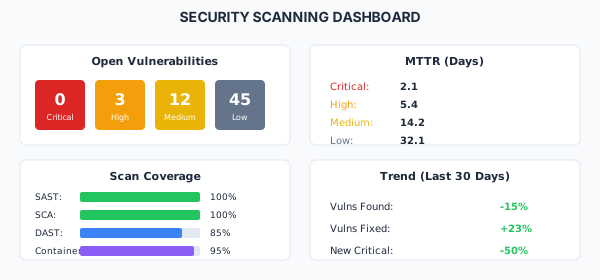
Dashboard Example
Security Scanning Dashboard Best Practices
Do
Scan on every commit and build
Block deployments on critical findings
Track all vulnerabilities centrally
Set severity-based SLAs for remediation
Include scanning in developer workflows
Review and tune rules to reduce false positives
Generate SBOMs for compliance
Don't
Ignore scan results until audit time
Accept risk without documentation
Rely on a single scanning tool
Skip scanning for "minor" changes
Allow critical vulnerabilities to production
Set unrealistic remediation timelines
Compliance
This section fulfills ISO 13485 requirements for design verification (7.3.6) and improvement (8.5.1), and ISO 27001 requirements for vulnerability management (A.8.8), security testing (A.8.29), and technical compliance review (A.5.36).
View full compliance matrix