
Healthcare Data Lake
Consequential Data Engineering · Healthcare data engineering for health information networks, provider organizations and health-tech teams
Get your data ready for decisions and AI. You keep control. Netspective turns feeds from clinical, billing and partner systems into checked, traceable tables your analysts and models can rely on. We build it inside your own cloud account, so the data, the keys and the code stay yours from the first day.
You run feeds for a health information network
Partner feeds change shape, valid messages still bounce, and the onboarding backlog grows. Start with how a validation gate and a triage queue clear it.
You lead data or AI for a health system
Late-coded encounters move the numbers after a period closes, and nobody can trace a total back to its records. Start with what ready data means.
What ready means
Ready data is data that is useful for a named use case, permitted for that use, traceable back to the source records it came from, and normalized to a model your team agreed, with a defined path for every record that fails validation.
In short: we take the feeds you already receive, check each record against the base standard and your partners’ rules, keep a raw copy, and prepare SQL tables that reporting, analytics and AI features can use. Records that fail go to a triage queue with the reason attached. It all runs in your AWS account or Azure subscription, and you can take it over, or hand it to another vendor, whenever you choose.
Where healthcare data work stalls
Most provider organizations and health information networks already hold the data they need. It sits in clinical, billing, scheduling and financial systems that were never designed to agree with one another.
Feeds arrive in different shapes
Encounter, billing and scheduling data arrive from separate systems, on different schedules and in different formats, so no single table answers a plain operational question. Each direct interface between two applications is another copy of the data and another dependency; changing one system can break several feeds.
Late-coded records fall out of the period
An encounter coded after a reporting or payment cut-off drops out of that period’s numbers and has to be reconciled later, often by hand.
Valid data still gets rejected
A message can pass the base HL7 v2 or FHIR R4 rules and still be rejected by the partner that receives it, because that partner’s implementation guide adds rules of its own. The rejection arrives late, without context, and someone has to work out what to fix. Read the guide to downstream rejections.
Numbers nobody can trace
When transformations are scattered across separate jobs, a report total cannot be traced back to the source records behind it.
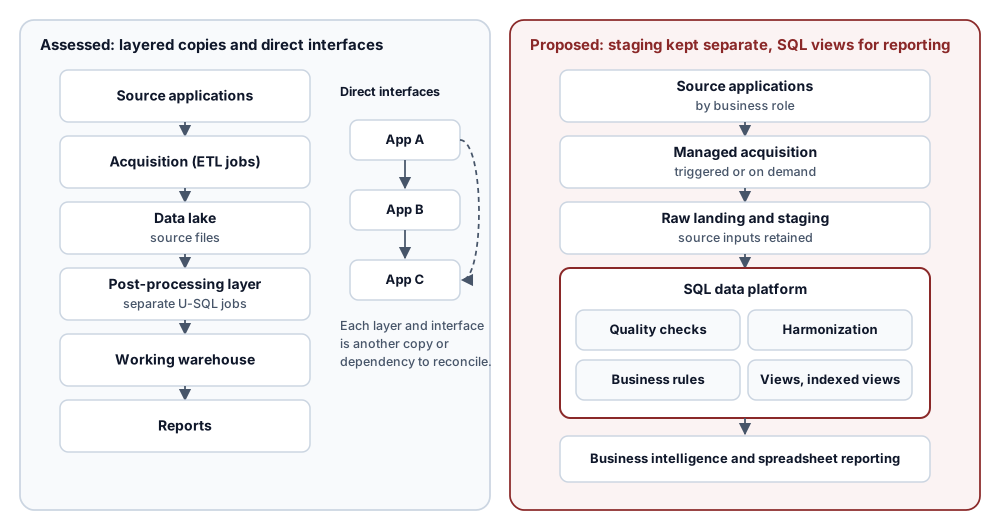
Assessed state: source applications, acquisition jobs, a data lake of source files, a separate U-SQL post-processing layer, a working warehouse, then reports; applications also exchange data through direct point-to-point interfaces.
Proposed pattern: source applications by business role, managed acquisition, retained raw landing and staging, then a SQL data platform holding quality checks, harmonization, business rules, views and indexed views that business intelligence and spreadsheet reporting read.
From source to ready, inside your own cloud account
Each feed follows the same path, and each step leaves a record you can inspect.
- Validated before it is stored. Accepted messages land in query-ready tables; rejected messages go to a triage queue with the reason attached.
- Traceable. Each stored record carries lineage back to the source message it came from.
- Reconciled on a rule. Late-arriving and late-coded records follow a cut-off and reconciliation rule your team agrees during discovery, not one-off fixes. Read the guide to late-coded encounters.
- Yours to keep. Keys, access policies and infrastructure code stay in your tenant and your repository, as the ownership table below sets out.
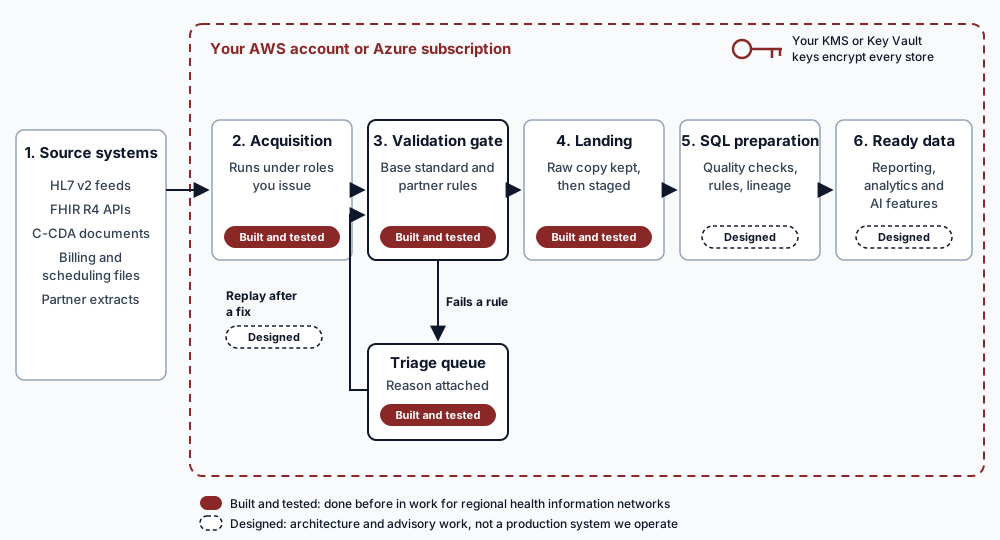
- Source systems. HL7 v2 feeds, FHIR R4 APIs, C-CDA documents, billing and scheduling files and partner extracts, outside your cloud account.
- Acquisition Built and tested. Ingestion runs under roles you issue and can revoke.
- Validation gate Built and tested. Each message is checked against its HL7 v2 structure, FHIR R4 profile or C-CDA template and the receiving partner’s rules. A record that fails goes to a triage queue with the reason attached Built and tested, and is replayed through the gate after a fix Designed.
- Landing Built and tested. A raw copy is kept in object storage encrypted with your KMS or Key Vault keys, then staged.
- SQL preparation Designed. Quality checks, harmonization, business rules and lineage in one SQL platform.
- Ready data Designed. Query-ready tables and views for business intelligence, SQL reporting, analytics and AI features.
Query Explorer: Inspect the Records Each Step Leaves
Each step in the path above leaves a record. These three queries show the checks the SQL preparation stage is designed to answer. They are written in standard SQLite so anyone can run them; on your own SQL platform the same logic is ported to its dialect.
Panel 1: Open triage items by partner and rule
Every message the validation gate rejected in the last seven days and nobody has resolved yet, grouped by the partner and the rule it failed: the onboarding backlog as a query.
-- Synthetic illustration: open triage items by partner and failed rule,
-- for messages received in the last seven days.
CREATE TEMP TABLE IF NOT EXISTS triage_item (
  message_id TEXT PRIMARY KEY,
  partner TEXT NOT NULL,
  format TEXT NOT NULL CHECK (format IN ('HL7 v2', 'FHIR R4', 'C-CDA')),
  rule_id TEXT NOT NULL,
  reason TEXT NOT NULL,
  received_utc TEXT NOT NULL,
  resolved_utc TEXT
);

SELECT partner,
       format,
       rule_id,
       reason,
       COUNT(*) AS open_items,
       MIN(received_utc) AS oldest_received
FROM triage_item
WHERE resolved_utc IS NULL
  AND received_utc >= strftime('%Y-%m-%dT%H:%M:%SZ', 'now', '-7 days')
GROUP BY partner, format, rule_id, reason
ORDER BY open_items DESC, oldest_received;
Synthetic illustration TEMP stand-ins with an illustrative layout, not a product schema; nothing is written. Each triage item keeps the failed rule and the reason, as the validation gate stage above describes. Dates are ISO 8601 text, so string comparison is date order. Runs as written in SQLite 3.
Panel 2: Late-coded encounters and the period they count in
Encounters coded after their reporting period closed, and the next open period the agreed rule carries them into, so a closed period's numbers stay as they were reported.
-- Synthetic illustration: encounters coded after their reporting period
-- closed, and the open period the agreed rule counts them in.
CREATE TEMP TABLE IF NOT EXISTS reporting_period (
  period_id TEXT PRIMARY KEY,
  starts_on TEXT NOT NULL,
  ends_on TEXT NOT NULL,
  closed_utc TEXT
);
CREATE TEMP TABLE IF NOT EXISTS encounter (
  encounter_id TEXT PRIMARY KEY,
  date_of_service TEXT NOT NULL,
  coded_utc TEXT NOT NULL
);

SELECT e.encounter_id,
       e.date_of_service,
       e.coded_utc,
       p.period_id AS service_period,
       (SELECT n.period_id
          FROM reporting_period n
         WHERE n.starts_on > p.starts_on
           AND (n.closed_utc IS NULL OR n.closed_utc > e.coded_utc)
         ORDER BY n.starts_on
         LIMIT 1) AS counted_in_period
FROM encounter e
JOIN reporting_period p
  ON e.date_of_service BETWEEN p.starts_on AND p.ends_on
WHERE p.closed_utc IS NOT NULL
  AND e.coded_utc > p.closed_utc
ORDER BY e.date_of_service;
Synthetic illustration TEMP stand-ins with an illustrative layout, not a product schema; nothing is written. The carry-forward rule here (next period still open when the encounter was coded) is one example; your team agrees the real rule during discovery, as the late-coded encounters guide explains. Runs as written in SQLite 3.
Panel 3: Ready rows with no lineage to a source message
Rows in a ready table that cannot be walked back to a stored source message: each one is a number nobody could trace.
-- Synthetic illustration: rows in a ready table that cannot be traced back
-- to a stored source message.
CREATE TEMP TABLE IF NOT EXISTS source_message (
  message_id TEXT PRIMARY KEY,
  partner TEXT NOT NULL,
  received_utc TEXT NOT NULL
);
CREATE TEMP TABLE IF NOT EXISTS ready_encounter (
  row_id INTEGER PRIMARY KEY,
  encounter_id TEXT NOT NULL,
  loaded_utc TEXT NOT NULL
);
CREATE TEMP TABLE IF NOT EXISTS lineage (
  row_id INTEGER NOT NULL REFERENCES ready_encounter(row_id),
  message_id TEXT NOT NULL REFERENCES source_message(message_id),
  PRIMARY KEY (row_id, message_id)
);

SELECT r.row_id,
       r.encounter_id,
       r.loaded_utc
FROM ready_encounter r
WHERE NOT EXISTS (
  SELECT 1
  FROM lineage l
  JOIN source_message m ON m.message_id = l.message_id
  WHERE l.row_id = r.row_id
)
ORDER BY r.loaded_utc;
Synthetic illustration TEMP stand-ins with an illustrative layout, not a product schema; nothing is written. An empty result means every row has lineage. It is a check, not a verdict: a reviewer still samples rows and reads the source messages. Runs as written in SQLite 3.
What a first engagement looks like
The first engagement is a bounded Architecture Discovery. It starts with what you already know about your sources and cloud, and ends with a plan you can approve or set aside.
What you bring
What you get
What you decide
What is not included
Proof: what we have done, and where it stops
Each claim on this page carries one of four tags, and engagements are described by the type of organization, not by client name, until each client approves being named.
| Claim | Status | What it rests on |
|---|---|---|
| Clinical ingestion pipelines and HL7 v2 and FHIR validation engines | Built and tested | Work for regional health information networks, where Netspective engineers built and tested these pipelines and validation engines. |
| Architecture assessment and solution design for physician productivity and compensation data | Designed | The first case study below: existing-state and proposed diagrams and the calculation and reporting requirements. |
| Phase I data strategy and a conceptual layered reference architecture | Designed | The second case study below: current-state assessment, guiding principles and stakeholder review materials. |
| Day-to-day operation of the data lake after handover | Operated by client | By design: your team, or a vendor you choose, runs it under your own roles, using the exit package described below. |
| Measured savings, return on investment, uptime figures or automated payroll | Not established | None of the work above measured these, so this page claims none of them. |
Delivery experience & case studies
Operational Data Platform for Physician Productivity and Compensation
A data architecture approach to consolidating operational inputs, applying transparent calculation rules and supporting explainable reporting
Compensation decisions depended on activity and pay information spread across operational, scheduling, billing and financial systems, with rules and timing differences that needed consistent treatment.
Designed Architecture and advisory work. Not a production system we operate.
Healthcare Data Strategy & Reference Architecture
Designing a business-aligned foundation for interoperable clinical and operational data
Complex legacy systems, duplicated content and point-to-point integrations made interoperability and modernization difficult.
Read the full case study and its evidence: Healthcare Data Strategy & Reference Architecture
Designed Architecture and advisory work. Not a production system we operate.
Multi-Format Health Data Intake, Validation and Conversion Platform
Architecture and ingestion engineering for a state public-sector health and social-care initiative
Independent senders submitted data in mixed formats (FHIR, CSV, C-CDA, HL7 v2) against a repeatedly changing state Implementation Guide, with no per-sender validation visibility before downstream lake rejection.
Built and tested Built and tested in pre-production. Production operated by client.
Which approach fits?
Most organizations already have some of these, and they combine well: an interface engine often stays as the routing layer. The table sets out what each is typically built to do.
| Question | Your interface engine | EHR vendor analytics | Self-build on AWS or Azure | Netspective engagement |
|---|---|---|---|---|
| What is it built to do? | Route and transform messages between systems you already run. | Report on data inside that EHR’s own model. | Whatever your team designs and builds. | Build a governed path from each source to ready tables, in your tenant, and hand it over. |
| Data from outside the EHR? | Passes it through; keeping a governed history is usually outside its job. | Limited to what the vendor’s model takes in. | Yes, if you build each feed. | Yes: billing, scheduling and partner feeds follow the same validation and lineage path. |
| Partner rules and triage? | Message-level checks, configured per interface. | Not its main purpose. | You build and maintain them. | A validation gate with a triage queue that records the reason for each failure. |
| Who owns the code and infrastructure? | You license the engine from its vendor. | The EHR vendor. | You. | You, from the first day, in your repository and tenant. |
| What do you need in-house? | Interface analysts. | EHR reporting analysts. | Data engineers, cloud and security staff, and the time to build. | Data owners and a decision-maker; operations by your team, by us under your roles, or by another vendor. |
What Netspective builds in your tenant
Clinical ingestion pipelines for HL7 v2, FHIR R4 and C-CDA
Interfaces that receive HL7 v2 ADT and ORU feeds, FHIR R4 bundles and C-CDA documents, land them in object storage you own, and record lineage from each source message to the stored record.
Schema validation and transforms
Each message is checked against its HL7 v2 message structure, FHIR R4 profile or C-CDA template before it is accepted. Failures go to a triage queue with the reason attached instead of into the lake; accepted data is normalized into query-ready tables.
Infrastructure you own: keys, access and code
Your KMS or Key Vault keys encrypt the data, your IAM or Entra ID policies decide who can reach it, and the Terraform or OpenTofu code that builds it lives in your repository, with its state in a backend you own.
What you own, and what we do
You retain 100% ownership of every asset in this table from the first day of the engagement. Netspective works inside your tenant under named roles you issue and can revoke.
| Asset | Owner | Netspective's role |
|---|---|---|
| AWS account or Azure subscription and tenant | Customer | Works inside it under named, least-privilege roles you issue and can revoke. |
| Root encryption keys (AWS KMS or Azure Key Vault) | Customer | Never holds, exports or escrows root key material. |
| Identity and access policies (IAM or Entra ID) | Customer | Proposes least-privilege policies; you approve them and can remove any Netspective principal at any time. |
| Infrastructure code (Terraform or OpenTofu) and its state | Customer | Commits modules to your repository; state lives in a backend you own. |
| Pipeline code: ingestion, validation and transforms | Customer | Commits every pipeline to your repository. |
| Documentation, data dictionaries and runbooks | Customer | Delivers them in your repository, not in a Netspective portal. |
| Data, including PHI | Customer | Processes it only inside your tenant, for the contracted purpose. |
Your exit path
Every engagement keeps an exit package current from the first sprint, so you can move operations in-house or to another vendor at any time, with no vendor lock-in. The package contains five parts:
- Inventory. Every account, role, key and repository, generated from the infrastructure code's state rather than kept by hand.
- Access-revocation runbook. The ordered steps to remove every Netspective principal and rotate any secret our engineers have seen.
- Reproducible IaC execution plans. A recorded
terraform planortofu plan, generated from the infrastructure code in your repository, that describes the environment with no Netspective-only inputs. A plan records what the code would create; it is not a tested rebuild. - Operations runbooks. Ingestion monitoring, validation-failure triage, key rotation, backup and restore, and incident response, written for your team or another vendor.
- Knowledge-transfer plan. Named sessions and the artifacts each session covers.
What the exit package does not depend on
None of the five parts needs a Netspective account, tool or licence to use. Any tooling we bring that is not assigned to you is named in the statement of work, with a licence that survives the end of the engagement.
Security and compliance are shared: the controls you can verify
HIPAA obligations stay with your organization, and no architecture removes them. Each party carries out a defined part, so we state the split and name the controls you can check.
| Party | Responsible for |
|---|---|
| Cloud provider (AWS or Azure) | Physical security and the HIPAA-eligible services covered by your Business Associate Agreement with them. |
| Your organization | Your HIPAA obligations, access approvals and workforce policies, and the keys and policies in your tenant. |
| Netspective | The pipelines, validation and controls named in the statement of work, built only from HIPAA-eligible services, with evidence you can review. |
This table describes how responsibilities are usually divided. It is not legal advice: your contracts, including each Business Associate Agreement, decide who is responsible for what.
- HIPAA-eligible cloud architecture: only services your cloud provider lists as HIPAA-eligible, under your Business Associate Agreement.
- Auditability: CloudTrail or Azure Activity Log and data-access logs retained in storage you own; every infrastructure change traceable to a commit. Supports the Security Rule’s audit controls standard, 45 CFR §164.312(b).
- Customer-managed access controls: IAM or Entra ID policies you own and approve; every Netspective role can be revoked. Supports the access control standard, 45 CFR §164.312(a)(1).
- Data sovereignty: data, keys and region selection stay in your tenant; data at rest is encrypted under your keys, the addressable encryption specification at 45 CFR §164.312(a)(2)(iv).
- Independent attestation: Netspective’s SOC 2 Type 1 and Type 2 attestation reports, issued by an independent CPA firm, are available under a nondisclosure agreement. How to request them.
How each engagement documents the split
Each engagement maps every control to the party that operates it in a responsibility matrix delivered with the runbooks, so an auditor can see who runs each control and where its evidence is kept.
Questions buyers ask
How does an engagement with Netspective start?
With a bounded Architecture Discovery. You bring a list of your sources, the specifications or sample layouts for each feed (never patient data), the data owners, and the decision or use case the data has to support. You receive a gap analysis, a target architecture for your own AWS or Azure tenant, and a roadmap with acceptance criteria. Discovery starts only after you approve its written scope.
What does ready data mean?
Data is ready when it is useful for a named use case, permitted for that use, traceable back to the source records it came from, and normalized to a model your team agreed, with a defined path for every record that fails validation.
Where does our data live, and who holds the keys?
In your AWS account or Azure subscription. Your KMS or Key Vault keys encrypt it, and Netspective never holds, exports or escrows root key material. Our engineers work under named roles you issue and can revoke at any time.
Why does valid data still get rejected downstream?
A message can pass the base HL7 v2 or FHIR R4 rules and still fail the receiving partner's implementation guide: a profile element the guide requires is missing, a code comes from the wrong value set, an empty field is read as a default, or a repeating field is parsed as a single value. Checking each message against the receiving partner's rules before release, and routing failures to a triage queue with the reason attached, finds these before the partner does.
How are late-coded encounters handled?
An encounter coded after a reporting or payment cut-off is assigned to a period by a written attribution rule your team agrees during discovery, for example by date of service with a carry-forward into the next open period. Every carried-forward record keeps an audit trail of when it arrived and which period it was counted in.
Can Netspective operate the data lake after go-live?
If you choose. Our engineers can monitor ingestion, triage validation failures and run key rotation through your KMS or Key Vault policies, using roles your team issues and can withdraw. You can move that work in-house or to another vendor at any time, using the exit package.
Does the data lake make us HIPAA compliant, and do you have a SOC 2 report?
No architecture makes an organization HIPAA compliant. Your obligations stay with you, and each control is split between your cloud provider, your organization and Netspective, as the shared-responsibility table on this page sets out. Netspective's SOC 2 Type 1 and Type 2 attestation reports, issued by an independent CPA firm, are available under a nondisclosure agreement.
Four phases, each ending in a decision you make
No phase starts until you approve the one before it. Each phase names what we need from your team and what you receive at its end.

- Discovery. You provide source access, data owners and priority use cases. You receive a gap analysis and a target architecture blueprint with a delivery roadmap and acceptance criteria. Gate: you approve the architecture.
- Prototyping. You provide one scoped feed and named roles in your tenant. You receive a working pipeline for that feed in your tenant and its validation results. Gate: you accept the prototype.
- Production buildout. You provide production access approvals and approval of key and IAM policies. You receive pipelines and validation, with infrastructure code and runbooks in your repository. Gate: you approve go-live.
- Governance handover. You name the team or vendor taking over, or choose ongoing operations. You receive the exit package, knowledge-transfer sessions and revocable access. Gate: you confirm the handover.
Request an architecture discovery
Discovery is the first phase of the roadmap above; what it includes is set out earlier on this page.
What happens next
Five required fields: who you are, your role and what you are trying to fix. The project details are optional.